Analytics integration
analyticsLink NC Analytics reports and datasets to Open Register objects. Detail-page widget embeds the report's visualisation inline. Provider stub today.
Tie a report or dataset in NC Analytics to an Open Register object so the chart shows up on the object's detail page. The provider registers today — the Analytics tab and widget surface as soon as NC Analytics is installed — but the wrapped service + link table land in a follow-up.
Screenshot
The integration registers in OpenRegister's in-page registry and renders as one of the tabs on the standalone integrations view. The tab is highlighted active here so you can see exactly which surface this leaf controls.
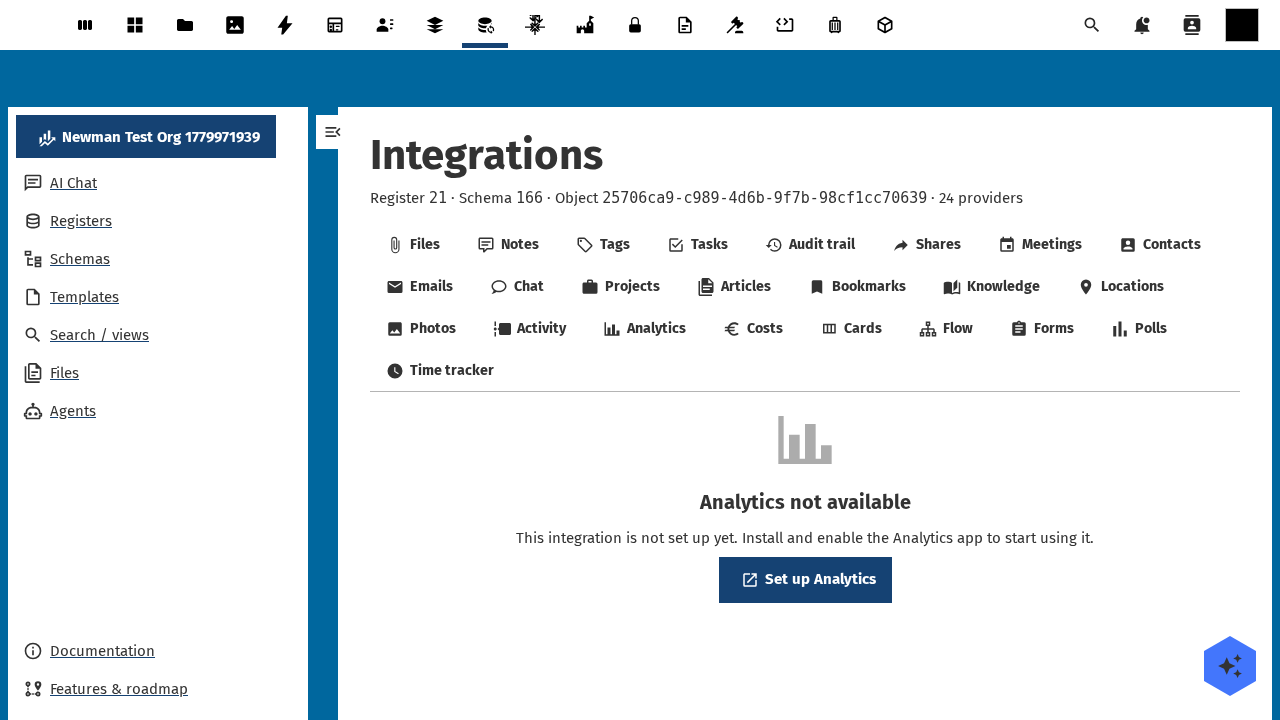
Captured by tests/e2e/leaf-screenshots.spec.ts against the seeded integration-verification register on the dev container. Empty state (Nothing linked yet) is expected on a freshly seeded object — link an upstream entity from the tab's + Add affordance to populate it.
What it will do
- Lists Analytics reports linked to each Open Register object on the Analytics sidebar tab, with inline chart previews.
- Embeds the linked report's visualisation directly on detail-page and dashboard widgets.
- Resolves a
referenceType: 'analytics'schema property to a single-entity chip (report title + last-updated).
Setup
1. Install NC Analytics
Install the analytics Nextcloud app. The Analytics tab appears once it's enabled. The OCS capabilities reports enabled: true.
2. Use it on an object
Open any object whose schema declares linkedTypes: ['analytics']. The Analytics tab appears in the sidebar. Today it renders the empty state until the wrapping service lands.
Configuration
| Field | Open Register side | NC Analytics side |
|---|---|---|
| Storage | link-table (openregister_analytics_links, pending) | NC Analytics report + dataset tables |
| Refresh | Per render (chart re-renders from the dataset) | — |
| Auth | None (uses session) | NC Analytics ACL |
Local verification setup
The leaf-verification harness in tests/e2e/leaf-verification.spec.ts probes every advertised provider against the seeded integration-verification register; you can reproduce a single-leaf check by hand against any OpenRegister dev container.
1. Install the analytics Nextcloud app
docker exec -u www-data nextcloud php occ app:install analytics
docker exec -u www-data nextcloud php occ app:enable analytics
docker exec nextcloud apache2ctl graceful   # bust OPcache so the registry sees the new app
Without analytics enabled, the analytics provider reports enabled: false on the OCS capabilities payload and its sub-resource endpoint refuses to dispatch.
2. Probe the registry to confirm the provider is advertised
curl -s -u admin:admin -H 'OCS-APIRequest: true' \
  http://localhost:8080/ocs/v2.php/cloud/capabilities?format=json \
  | jq '.ocs.data.capabilities.openregister.integrations.providers[] | select(.id == "analytics")'
Expected payload — the enabled flag flips to true once the required app is installed.
3. Probe the per-object sub-resource
curl -s -u admin:admin -H 'OCS-APIRequest: true' \
  "http://localhost:8080/index.php/apps/openregister/api/objects/21/166/25706ca9-c989-4d6b-9f7b-98cf1cc70639/integrations/analytics"
Most recent harness run (against the seeded verification-probe object on this dev container):
- Status:
200(list-envelope) - Latency: 85ms
- Body: matches the documented list envelope below
{
  "items": []
}
The OCS-APIRequest: true header is mandatory — without it, Nextcloud's session-CSRF guard short-circuits with HTTP 412 before the provider runs. An empty items: [] is the correct response for a freshly-seeded object that hasn't been linked to any upstream analytics entity yet.
Current status
Provider registered. Wrapping service + link table tracked under openspec/changes/integration-analytics.
Related
- Leaf integration system — how every leaf wires the same way.
- Pluggable integration registry — the full ADR-019 contract.