Deck integration
deckLink existing NC Deck cards to an Open Register object or create a new card on a chosen board/stack from the object's Cards tab.
Drive a kanban workflow from an Open Register object. Link an existing Deck card, or create a new card on a board/stack of your choice straight from the object. The link lives in openregister_deck_links; the cards live in NC Deck.
Screenshot
The integration registers in OpenRegister's in-page registry and renders as one of the tabs on the standalone integrations view. The tab is highlighted active here so you can see exactly which surface this leaf controls.
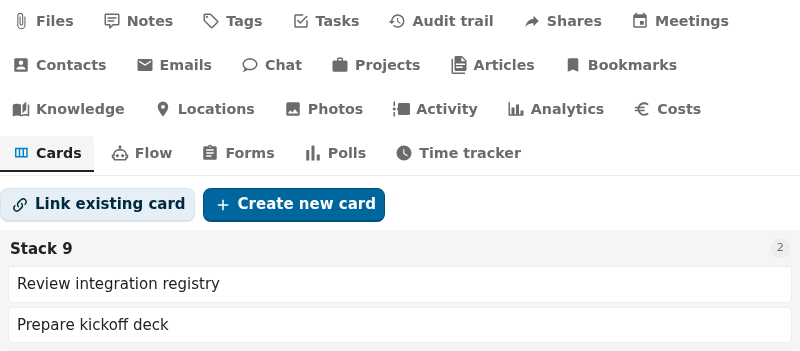
Captured by tests/e2e/leaf-screenshots.spec.ts against the seeded integration-verification register on the dev container. Empty state (Nothing linked yet) is expected on a freshly seeded object — link an upstream entity from the tab's + Add affordance to populate it.
What it does
- Lists Deck cards linked to each Open Register object on the Cards sidebar tab, with board, stack, and title.
- Lets users link an existing card by id.
- Lets users create a new card with a board + stack picker, title, and optional description. The new card lands in Deck and the link row is created in one step.
- Lets users unlink. The card stays in Deck; only the link row is removed.
- Resolves a
referenceType: 'deck'schema property to a single-entity chip. - Reverse lookup: "all objects linked to cards on a board" via
GET /api/deck/boards/{boardId}/objects.
Setup
1. Install NC Deck
Install the deck Nextcloud app. Without it, the Cards tab stays hidden and the OCS capabilities mark the leaf enabled: false.
2. Use it on an object
Open any object whose schema declares linkedTypes: ['deck']. The Cards tab appears in the sidebar.
- Link an existing card — paste a card id, or use the Deck-side picker.
- Create a new card — pick a board and stack from the dropdowns, give it a title and an optional description. The Deck integration creates the card via Deck's internal service classes (not OCS), so board / stack permissions are respected.
- Unlink — removes the link row only.
Configuration
| Field | Open Register side | NC Deck side |
|---|---|---|
| Storage | link-table (openregister_deck_links) | None (card is the source of truth) |
| Mapping | board id, stack id, card id, cached title | Deck oc_deck_cards.id |
| Refresh | Per render (board/stack list cached briefly) | — |
| Permissions | Inherits from object RBAC + Deck's own | Deck board permissions |
What gets stored on the link row
boardId        — Deck board id
stackId        — Deck stack id (the column)
cardId         — Deck card id
cardTitle      — cached title (for fast render)
linkedBy       — NC user id
linkedAt       — link timestamp
The card stays the source of truth: stack moves and title edits flow through Deck and are visible on the next render via the cache refresh.
Using it
Cards sidebar tab
The tab lists linked cards grouped by board. Each row shows title, stack position, and an "open in NC Deck" anchor. The inline "Add card" form opens the link-or-create flow.
Detail-page widget
Surfaces linked cards with a mini-kanban view that shows stack position. The "Add card" CTA opens the same flow as the tab.
Dashboard widgets
user-dashboard— your top 5 linked cards across every object.app-dashboard— cards scoped to the consuming app's register/schema.
Reference property
A schema property typed as { "type": "string", "referenceType": "deck" } renders the linked card's title + stack chip in CnFormDialog and CnDetailGrid.
Reverse lookup by board
To find every object linked to a card on a given board:
GET /index.php/apps/openregister/api/deck/boards/{boardId}/objects
Returns { objectUuid, register, schema, cardId, cardTitle, stackId }. Use this to surface "which cases are on this board?" on Deck-driven landing pages.
Troubleshooting
- Board / stack picker is empty. The user has no boards in Deck. Create one in NC Deck first.
- "Deck card not found" on link. The card id you pasted doesn't exist or you don't have read access on the board.
- "Card already linked to this object." A single (object, card) pair can only exist once. To re-link, unlink first.
- Cards disappear from the tab. The Deck card was deleted. The link row's
cleanupOnDeletecascade removes it. - Tab is missing. Either NC Deck isn't installed or the object's schema does not declare
linkedTypes: ['deck']. Check both.
Related
- Leaf integration system — how every leaf wires the same way.
- Flow leaf — automate "object created → Deck card created" via NC Flow rules.
- Pluggable integration registry — the full ADR-019 contract.